




With two-factor protection, you also enter a 6‑digit code from an app on your phone when you log in. You turn it on and off yourself in the client area.
Set up Log in Turn off Phone lost
Set up
You need an authenticator app on your phone, for example Google Authenticator, Microsoft Authenticator or Aegis.
- In the client area, open the menu under your name at the top right and tap Two-Factor Protection.
- Tap Set Up Now, then Get Started in the window. You then see a QR code.
- Scan the QR code with your app. The app then shows a 6‑digit code.
- Enter the code in the window and confirm.
- Write down the backup code we show you now and keep it safe.
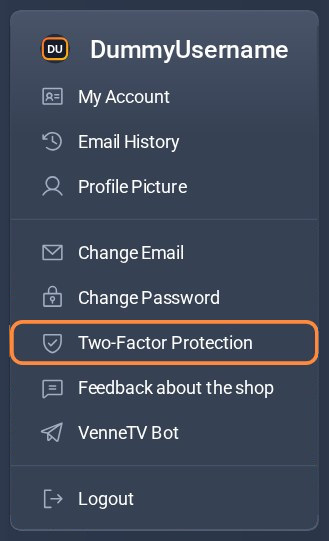
Step 1: menu under your name.
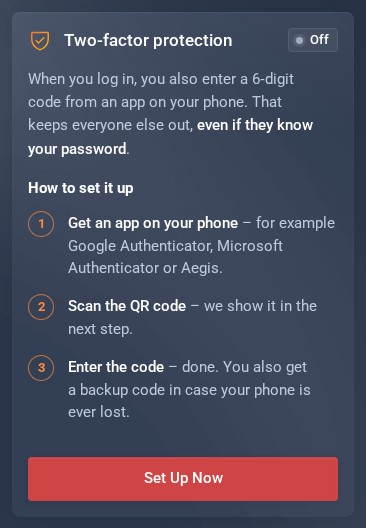
Step 2: Two-Factor Protection page.
Good to know
- The protection applies to logging in to the client area. Your access and your apps on the TV do not change.
- We show the backup code only once. It gets you into your account when your phone is not at hand.
- Two-factor protection is optional. You can turn it off again at any time.
Logging in with two-factor protection
- Log in as usual with your email address and password.
- Open your app and enter the 6‑digit code it currently shows.
Turn off
- Open Two-Factor Protection in the menu under your name.
- Tap Turn Off Protection and confirm with your password. After that, your password alone is enough to log in again.
Phone lost or new?
- You have your backup codeWhen logging in, tap Log In with Backup Code and enter it. You then get a new backup code.
- New phoneLog in, turn the protection off and set it up again with the app on your new phone.
- No phone and no backup codeWrite to us via the contact form and give the username and password of your active access. That's how we recognise you. Then we turn the protection off for you.
Open two-factor protection (in the client area) Can't get into your client account? Contact form
